

Introduction – What the Naptime Jugo Does and Who It’s For
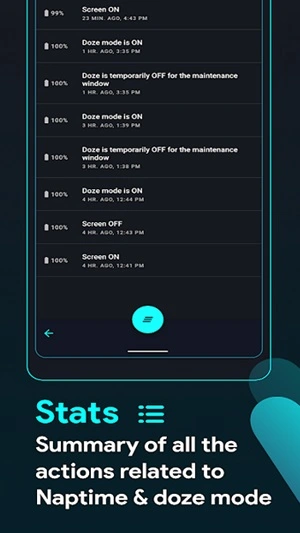
Naptime Jugo is a mobile battery optimization utility designed to help Android devices conserve energy when they are not actively being used. The Naptime Jugo app improves Android’s built in Doze system by forcing it to activate faster after the screen turns off.
Normally, Android phones wait several minutes before entering deep sleep mode. During that waiting period, background applications can still consume battery power. Naptime Jugo changes this behavior by adjusting system settings so the device can enter power saving mode much earlier.
This app is ideal for Android users who want longer battery life without constantly managing background applications manually. It is especially useful for people with older phones, heavy app usage, or devices that lose battery overnight.
I decided to explore the Naptime Jugo app because many Android devices still struggle with background power consumption. A tool that intelligently activates Doze mode earlier can significantly extend standby time and improve daily battery performance.
Main Highlights and Unique Features of Naptime Jugo APK latest version
- Forces Android Doze mode to activate sooner after the screen turns off, reducing unnecessary background activity.
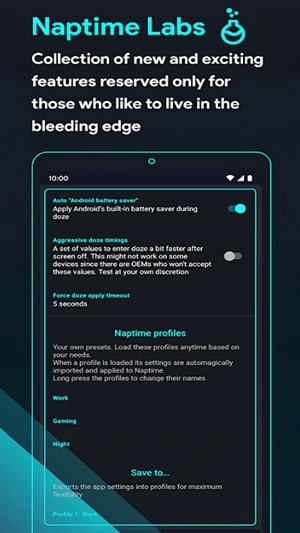
- Advanced Doze configuration allows users to adjust parameters that control how aggressively the device saves power.
- Works without complicated system modifications on many devices, making it accessible for both casual and advanced users.
- Helps reduce battery drain caused by background apps, network syncing, and idle processes.
- Lightweight design ensures the app itself uses minimal system resources.
- Provides control over Android power management that normally requires developer level settings.
How to Download Naptime Jugo
- Enable Unknown Sources
- Open the Settings menu on your Android device.
- Go to Security or Privacy settings.
- Enable the option that allows installations from unknown sources.
- Download APK File From APKZOZO
- Visit APKZOZO using your mobile browser.
- Search for Naptime Jugo and download the latest APK file to your device.
- Install the APK
- Locate the downloaded APK file in your Downloads folder.
- Tap the file to begin installation.
- Confirm the installation permission and wait for Android to finish installing the app.
- Launch and Use the App
- Open the Naptime Jugo app from your app drawer.
- Grant the required permissions so it can manage Doze settings.
- Adjust the power saving parameters and let the app optimize your battery usage.
Top Benefits and Advantages of Using Naptime Jugo
- Longer standby battery life: The app significantly reduces idle battery drain, especially overnight.
- Improved background app control: Naptime Jugo limits background activity that normally continues even when the screen is off.
- Better battery efficiency without manual management: Users do not need to constantly close apps or monitor background processes.
- Lightweight optimization solution: Unlike many battery saver apps, Naptime Jugo focuses on system level Doze optimization rather than running constant monitoring services.
User Interface and Experience
The interface is simple and focused on power management controls. Most options are presented clearly so users can adjust settings without navigating complex menus.
During testing, I noticed my phone consumed noticeably less battery overnight. The device entered idle mode faster after the screen turned off, which reduced background activity.
Some community feedback also supports this experience.
A Reddit user wrote:
“This app finally made Doze work properly on my phone.”
A small Android YouTube channel mentioned:
“Naptime is one of the most effective tools for reducing standby drain.”
Is Naptime Jugo Safe to Download
Yes, Naptime Jugo is generally safe to download when obtained from trusted APK platforms like APKZOZO. The app primarily modifies Doze power management settings and does not require access to personal data. Always download the APK from a reliable source to avoid modified or unsafe versions.
FAQs – Download Naptime Jugo APK 2026 for Android for free
What does Naptime Jugo do
Naptime Jugo forces Android Doze mode to activate earlier, reducing battery drain when the device is idle.
Does Naptime Jugo require root access
Many features work without root, but some advanced power saving controls may require root permissions.
Will Naptime Jugo affect notifications
In most cases notifications still work normally, but aggressive Doze settings may delay background updates.
Is Naptime Jugo compatible with all Android devices
It works best on Android devices that support the Doze power saving system introduced in Android 6.0 and later.
Where can I download Naptime Jugo
You can download the latest APK version safely from APKZOZO.
Conclusion
Naptime Jugo is a powerful utility for Android users who want better battery performance without complicated configuration. By optimizing Android’s built in Doze system and forcing it to activate sooner, the app helps reduce background battery drain and extend standby time.
For users who often notice their phone losing power while idle, Naptime Jugo offers a practical solution that is simple to install and easy to use.